If you’ve ever spent hours troubleshooting a slow WordPress website, dealing with plugin problems, or trying to figure out why something suddenly stopped working, you’ll understand why I started looking for a different hosting provider.
I’ve been building websites since the days of Tripod and Blogspot. Over the years, I’ve used Wix, moved to WordPress with Bluehost, and eventually switched to BigScoots.
My main reason for switching wasn’t simply to find faster hosting. I wanted a hosting company that could support multiple WordPress websites, provide prompt technical assistance, and give me room to grow my online businesses.
After using BigScoots, upgrading my hosting package, experiencing their customer support firsthand, and seeing how they responded to a major PHP security vulnerability in October 2026, I’ve developed a pretty clear opinion about their service.
BigScoots isn’t the cheapest WordPress hosting provider, but for me, the service and peace of mind have been worth the additional expense.
Here’s why.
Affiliate Disclosure: This article contains affiliate links. If you purchase hosting through my links, I may earn a commission at no additional cost to you. I use BigScoots to host my own websites, and this review reflects my personal experience.
Why I Switched From Bluehost to BigScoots
Before moving to BigScoots, I was hosting my WordPress websites with Bluehost. Before that, I’d used Wix.
One of my biggest frustrations was website speed and loading performance.
Now, I want to be fair. I can’t say Bluehost was entirely responsible for the problems I experienced.
My WordPress theme wasn’t particularly well optimized, and I’ve since learned just how much themes, images, plugins, and caching settings can influence website performance. One thing I’ve learned through my work as a Pinterest strategist is that attracting visitors is only part of building a successful website. Once someone clicks through, your website needs to deliver a good experience. As I discuss in my article on understanding Pinterest traffic, traffic performance involves more than simply getting impressions or clicks. The experience visitors have after arriving on your website matters, too.
Still, I knew I wanted a different hosting experience.
I was managing more than one website and wanted a provider that could support multiple WordPress installations under one account.
Even more importantly, I wanted effective communication when something went wrong.
As a solopreneur, I’m responsible for creating content, maintaining websites, managing Pinterest strategies, and handling the everyday responsibilities of running a business.
I didn’t want to spend hours trying to diagnose technical problems when I could be working on growing my websites instead.
Was More Expensive Hosting Worth Considering?
At the time, my websites weren’t monetized.
That meant paying extra for hosting wasn’t an easy decision. Every additional business expense needed to have a purpose.
But I was thinking long-term.
If investing in better hosting could provide more dependable service, improve loading performance, and reduce the time I spent troubleshooting, I felt the additional expense might be justified.
Faster loading can also contribute to a better experience for visitors, although hosting alone doesn’t guarantee more traffic or lower bounce rates.
I wasn’t trying to grow my businesses overnight. I wanted a foundation I could build on gradually.
Why I Chose BigScoots
I began noticing how frequently BigScoots was recommended by other website owners and bloggers.
After researching several hosting providers, I kept coming back to BigScoots.
One thing that immediately impressed me was the user experience on their website.
Their information was easy to navigate and understand, which gave me more confidence in the company.
That might seem like a minor consideration when choosing hosting, but I believe good communication begins before you even become a customer.
I wanted a company that made its services understandable rather than overwhelming me with technical terminology.
I initially signed up for one of their smaller monthly hosting packages.
That allowed me to get started without committing to a much larger hosting expense than I needed at the time.
Explore BigScoots Managed WordPress Hosting
Moving My WordPress Websites to BigScoots
One of my first positive experiences with BigScoots was the website migration.
Their team handled the process, and it was remarkably straightforward.
My migration was completed within minutes, and I didn’t notice any downtime during the move.
I didn’t have to spend hours trying to transfer files, manage databases, or worry about breaking my website.
If you’re not technically confident about migrating a WordPress website, I’d recommend having the hosting company’s team handle it whenever that service is available.
BigScoots currently advertises complimentary managed migrations with its WordPress hosting packages. You can find the details on its official managed WordPress hosting page.
Of course, every website is different. A larger or more complicated migration may take longer than mine did.
For me, though, the process couldn’t have been easier.
Did BigScoots Improve My Website Speed?
Yes, I noticed faster loading after moving to BigScoots, even while I was still using my original WordPress theme.
I also began seeing more website traffic around that period.
However, I wouldn’t attribute the traffic increase entirely to switching hosting companies. There were other factors involved, and I can’t isolate hosting as the reason.
After migrating, I eventually decided that my WordPress theme needed replacing.
I chose a theme from Restored 316, a company whose designs and reputation appealed to me.

That was another important lesson: not all WordPress themes perform equally.
I also made additional performance improvements through image optimization, caching, and carefully configured plugins. Website performance is also something I consider when developing a broader Pinterest marketing strategy. There’s little point investing time into attracting visitors if the website itself isn’t prepared to receive them. Hosting, mobile usability, content quality, and website maintenance all deserve attention alongside Pinterest optimization.
Why Good Hosting Doesn’t Automatically Mean a Perfect PageSpeed Score
While working on Charming Pen in October 2026, I investigated why my homepage wasn’t performing as well as I wanted on Google’s mobile PageSpeed test.
My starting Lighthouse performance score was 66.
I experimented with image optimization, ShortPixel’s WebP delivery, and changing how my homepage image was displayed.
One of my subsequent tests reached 84, although another returned a lower result without further major changes.
I also saw Largest Contentful Paint improve from 7.9 seconds in an earlier test to 3.9 seconds in a later test.
The results weren’t completely consistent, and I wouldn’t claim that BigScoots alone caused those improvements.
Interestingly, a separate GTmetrix report available through my BigScoots dashboard recorded a performance score of 94 and a structure score of 98, with Largest Contentful Paint at 1.2 seconds.
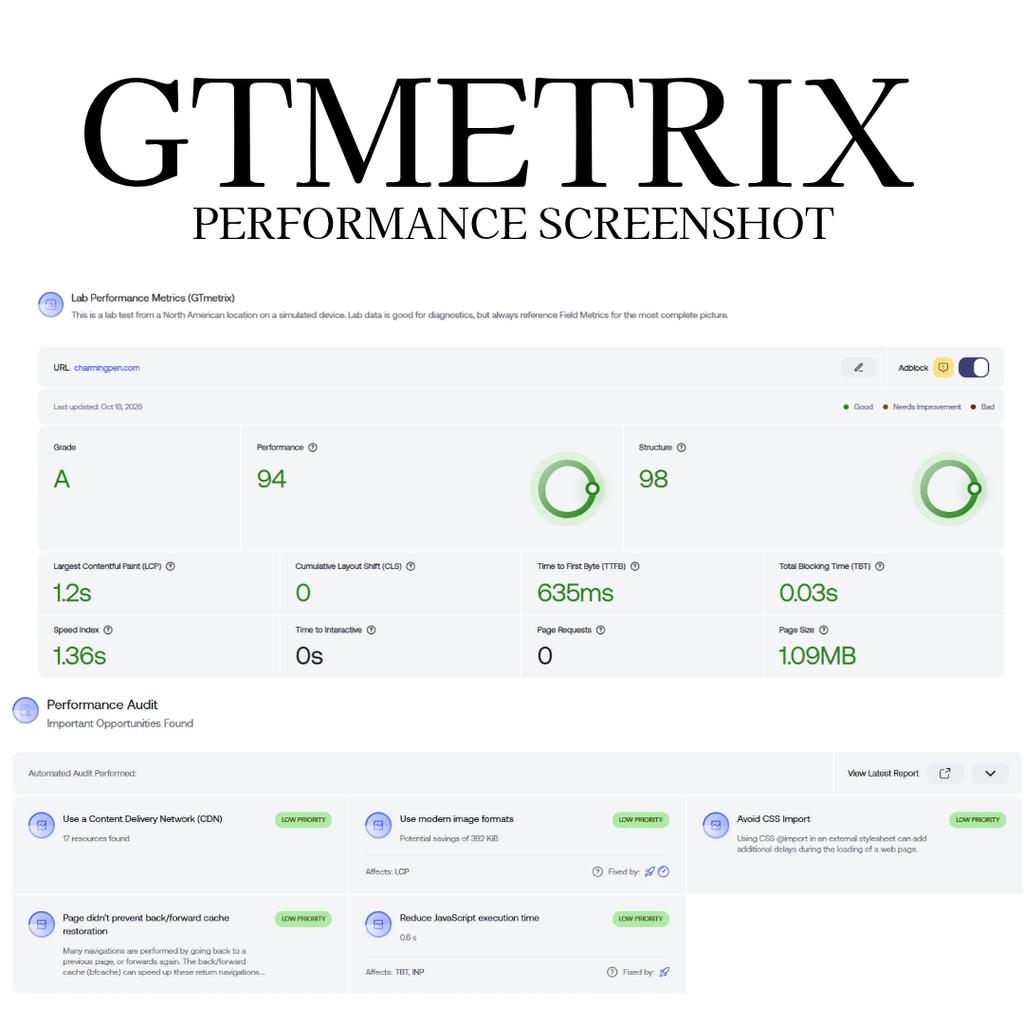
Those tests used different conditions, so they aren’t directly comparable.
What the experience reinforced for me is that your hosting provider is one part of website performance, not the entire solution.
Image sizes, modern image formats, caching, themes, fonts, and plugins all contribute to how quickly a website loads.
You can learn more about the measurements involved through Google’s Core Web Vitals documentation.
Having dependable hosting gives me a foundation to work from while I optimize everything else.
BigScoots Customer Support: The Biggest Reason I Stay
If there’s one thing that stands out about my experience with BigScoots, it’s their customer support.
They use a ticket-based support system, and in my experience, replies generally arrive within minutes.
But response time alone isn’t what impresses me.
It’s the fact that their team actually helps resolve problems.
I don’t want technical support that simply acknowledges an issue and leaves me to figure out the rest.
I want someone who understands what’s happening and can help me get things working again.
BigScoots has consistently provided that experience.

When a Plugin Created Too Many Image Files
One issue I encountered involved a plugin creating more image files than expected.
Those additional files began using up unnecessary storage space.
I contacted BigScoots, and their team helped identify and correct the problem quickly.
They also helped me understand the cleanup process so I could handle a similar situation myself in the future.
That was important to me.
I appreciate technical support that doesn’t just fix the immediate problem but also helps me become more confident managing my websites.
When I Noticed Suspicious Website Redirects
Another time, I noticed unexpected redirects occurring on website pages.
I was concerned that malware might be involved.
I reached out to BigScoots, and their support team assisted by running a malware scan.
Knowing I could contact someone experienced to investigate a potentially serious problem was reassuring.
I don’t have an in-house IT department.
Like many independent website owners, I wear several hats, and technical troubleshooting isn’t always where I want to spend my working hours.
How BigScoots Handled the October 2026 PHP2Shell Security Crisis
This is probably one of the strongest examples of why I appreciate managed WordPress hosting.
In October 2026, two critical security vulnerabilities were disclosed in PHP, the programming language used by WordPress and many other websites.
The vulnerabilities became known as PHP2Shell and were identified as CVE-2026-109618 and CVE-2026-109619.
The official PHP security advisory on October 21 urged PHP users to update immediately because the flaws could allow remote code execution under vulnerable conditions.
And here’s the interesting part.
I didn’t even know this was happening until BigScoots contacted me after the emergency had been addressed.

I wasn’t checking security advisories or trying to figure out whether my websites were vulnerable.
I was going about my regular business.
By the time I received BigScoots’ communication, its team was reporting that the relevant security work had already been completed.
What BigScoots Said Its Engineers Did
According to the security update BigScoots sent to customers, its engineers were preparing for the vulnerabilities before the official fixes became available.
The company explained that it had developed custom firewall rules to block attempts to exploit the vulnerabilities and had additional protections from Cloudflare and security partner Patchstack.
Once the official PHP patches were released on October 21, BigScoots reported that its engineers built, tested, and deployed patched PHP versions across its hosting network that same day.
Its communication also stated that it had found no evidence of breaches related to the incident within its network.
Most importantly, the message to customers was that the security patches were complete and no further action was required from us for that incident.
Those are BigScoots’ statements about its response, rather than something I independently audited on its servers.
The underlying PHP security issue was real and serious. Security researchers at JFrog published additional technical analysis of the vulnerabilities and their potential impact.
Why This Incident Reinforced My Decision to Use BigScoots
As a solopreneur, I’m already responsible for enough.
My days involve website content, Pinterest strategy, client work, and everything else that goes into managing multiple online businesses.
I’m not monitoring PHP security developments around the clock.
And even if I had known about the vulnerabilities immediately, dealing with server-level security patches isn’t something I’d want to manage myself.
Knowing the BigScoots engineering team had been actively responding before I was even aware of the problem made me appreciate their service even more.
Good hosting isn’t just about how quickly your website loads when everything is working. It’s also about what happens behind the scenes when something goes wrong.
For me, that’s one of the strongest arguments for investing in managed hosting.
Managing Multiple WordPress Websites With BigScoots
One of my original reasons for choosing BigScoots was the ability to manage multiple websites.
I don’t want to build every new business around a separate hosting account if I can avoid it.
I started with a smaller package, but as my websites developed, I needed additional storage for graphics, photographs, and other files.
I eventually upgraded to a higher hosting package.
My current hosting arrangement gives me significantly more storage and capacity for up to ten websites.
That provides room for Charming Pen and my other online projects as they grow.
BigScoots has since introduced new hosting packages and pricing.
It’s important to check the current specifications rather than assume every package supports the same number of websites.
The company’s managed WordPress pricing page outlines the available plans, including their website allowances, storage, and other resources.
I appreciate knowing I have room to expand without immediately needing to reconsider my hosting provider.
Is the BigScoots Dashboard Easy to Use?
BigScoots recently moved me to its newer hosting dashboard.
I’m happy with the change.
The interface is clean, intuitive, and straightforward to navigate.
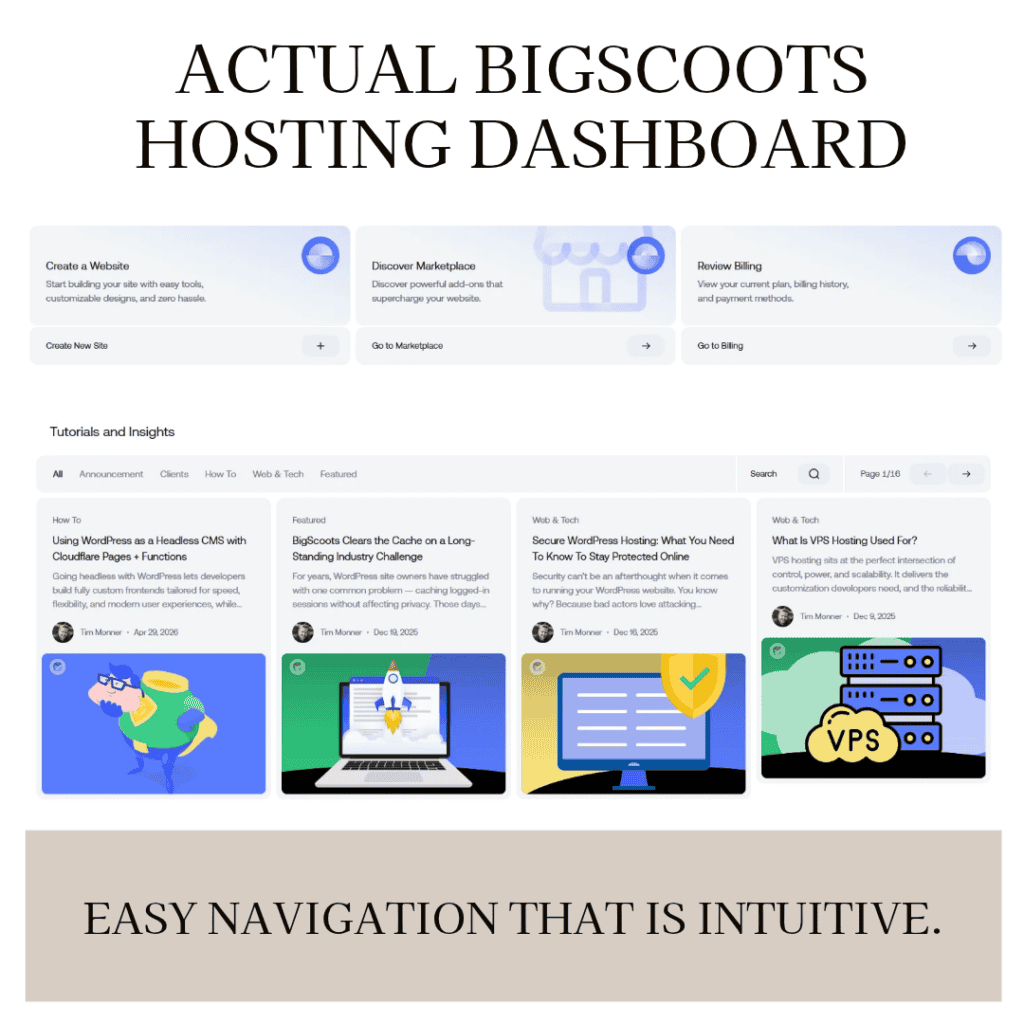
Whether you’re newer to WordPress or have managed websites for years, having a dashboard that doesn’t make everyday tasks unnecessarily complicated is valuable.
I also appreciate having access to website performance information within the hosting environment.
As someone who has used website-building platforms for decades, I’ve seen plenty of interfaces that make straightforward tasks more complicated than they need to be.
The newer BigScoots dashboard has been a positive experience for me.
What About Backups, SSL, and Website Security?
Another benefit of my BigScoots hosting experience is having important website-management responsibilities handled at the hosting level.
Daily backups are included with my service, and I can also create manual backups when needed.
That’s a relief because I’m not always thinking about backups while working on content.
BigScoots also provides SSL certificates and hosting-level security measures.
Of course, I still need to manage my WordPress installation responsibly, including themes, plugins, passwords, and other security practices.
Managed hosting doesn’t eliminate every website-security responsibility.
But it does mean I don’t have to handle every aspect of server maintenance on my own.
For someone managing several business responsibilities, that makes a difference.
BigScoots Pricing: Is It Worth the Extra Cost?
I don’t believe an honest hosting review should ignore the disadvantages.
For me, the biggest consideration is cost.
BigScoots is not the cheapest way to host a WordPress website.
As a Canadian, I also have to consider the exchange rate when paying in US dollars.
That can make the monthly expense feel considerably higher, especially when business revenue is still growing.
I hesitated when I first signed up, and I hesitated again when I needed to upgrade.
I also watched with some concern as BigScoots introduced its updated pricing structure. I’d seen discussions from other customers about pricing changes, although I wasn’t personally asked to make the same adjustment.
I don’t know whether that was because I already had a higher hosting package.
My advice is to look closely at the current hosting specifications, what happens when your site grows, and how much you can comfortably invest.
For someone starting a website on a very tight budget, less expensive hosting may be the more practical choice initially.
Beyond pricing, however, I haven’t encountered a major limitation that would make me want to move away from BigScoots.
That doesn’t mean everyone will have the same experience. It’s simply how the service has worked for me.
Is BigScoots Worth the Money for a Small Business?
For me, absolutely.
When I chose BigScoots, my websites weren’t generating substantial income.
I was investing in the businesses I wanted to build, rather than waiting until they were already successful.
I had long-term goals for Charming Pen and my other online projects.
Those goals haven’t changed.
I’m comfortable taking my time, creating content, improving my sites, and developing my business without feeling like everything needs to happen immediately.
What I don’t want is to spend that time constantly dealing with technical problems.
I would rather invest in reliable hosting and responsive support than repeatedly lose productive hours troubleshooting issues I don’t fully understand. Running an online business involves more than creating content and hoping visitors find it. There are research tools, publishing systems, website expenses, and ongoing management decisions to consider. I’ve shared more about the tools I use to run my Pinterest business, including how I approach the practical side of managing my work.
That doesn’t mean every new website owner needs premium managed hosting from day one.
But if you can reasonably afford it, I think hosting is one area of your online business worth investing in.
Check BigScoots Hosting Plans
Who Should Consider BigScoots Hosting?
Based on my experience, I think BigScoots is worth investigating if you’re managing multiple WordPress websites, growing an online business, or simply looking for more dependable technical support.
It may be especially appealing if you prefer having experienced people available to assist with migrations, hosting-related problems, and server maintenance.
On the other hand, if your primary goal is finding the absolute lowest-cost hosting, BigScoots may not be the right fit for your current budget.
There’s no point purchasing a hosting package that creates unnecessary financial strain.
Choose the services that support where your business is today while allowing you to plan for where you want it to go. If you’re building a website specifically to grow your business through Pinterest, it’s also worth making sure your Pinterest account is properly configured. My Pinterest account optimization checklist covers the foundational steps, including setting up your business account, organizing boards, and preparing your website to receive visitors.
Frequently Asked Questions About BigScoots
Is BigScoots good for WordPress websites?
In my experience, yes. I use BigScoots for my WordPress websites and have been particularly satisfied with their customer support, migrations, and hosting management.
Will BigScoots migrate my website for me?
BigScoots advertises managed website migrations with its WordPress hosting plans. My own migration was handled by their team, completed quickly, and involved no downtime that I noticed.
Does BigScoots improve website speed?
It can provide a strong hosting foundation, but your results will also depend on your WordPress theme, plugins, images, caching, and other settings. I noticed faster loading after moving, although I made further improvements through website optimization.
Can I host multiple websites with BigScoots?
Yes, depending on your plan. I upgraded my own hosting arrangement to support additional storage and multiple websites. Check the current plan allowances and any additional website fees before purchasing.
Does BigScoots provide website backups?
BigScoots advertises automatic backups among its managed WordPress hosting features. Backup frequency, retention, and additional options should be confirmed for your specific plan.
Is BigScoots expensive?
Compared with low-cost hosting providers, BigScoots can be a larger investment. As a Canadian customer, I also factor in currency conversion when budgeting for hosting.
Do I need to understand website security to use BigScoots?
You should still follow good WordPress security practices, but BigScoots handles important hosting-level responsibilities. Its response to the October 2026 PHP2Shell vulnerabilities was a particularly reassuring example for me.
My Final Thoughts: Would I Choose BigScoots Again?
Absolutely.
I’ve been building websites since the early days of Tripod and Blogspot, and I sometimes wish I could have had access to this kind of managed hosting support back then.
I can’t help wondering how much time I might have saved on those earlier projects.
Today, I manage websites and develop online businesses with a much clearer understanding of how valuable my time is.
BigScoots has given me fast, responsive technical support, straightforward hosting management, and the confidence to plan for future growth.
It’s not the least expensive option.
And choosing BigScoots won’t automatically make a slow theme fast, repair poorly configured plugins, or guarantee higher website traffic.
But for my needs, the combination of service, flexibility, and peace of mind has been worth the investment.
If you’re researching managed WordPress hosting for your own website or business, BigScoots is a provider I’d encourage you to consider.
Explore BigScoots WordPress Hosting
Disclosure: I’m a BigScoots affiliate and may earn a commission from qualifying purchases through my link, at no additional cost to you. This review is based on my own experience using the service.