Pinterest keyword research does not have to begin with a paid Pinterest SEO tool. You can find relevant keywords directly on Pinterest by studying the search bar, suggested search terms, search guides, visual search, and the results Pinterest returns for your topic.
This free method takes more time than using a Pinterest keyword research tool, but it gives you something valuable: a direct look at the language Pinterest currently associates with your subject.
Pinterest is often treated like one of many social media platforms, but it functions much more like a visual search engine. This guide focuses on how to find Pinterest keywords using the platform itself—not on building a complete keyword strategy or deciding where every phrase should be used.
That makes Pinterest itself the best way to gather free Pinterest keywords.
This guide focuses on how to find those keywords—not on building a complete Pinterest keyword strategy or deciding exactly where every phrase should be used.
What Are Pinterest Keywords?
Pinterest keywords are words and phrases that help describe what a piece of content is about.
Pinterest also uses broader topic signals and annotations to understand how content fits into its search system.
A primary keyword or main keyword usually identifies the central topic. Related keywords, specific phrases, and long-tail keywords help clarify the target audience, problem, format, method, occasion, or desired result.
A keyword might identify:
- the main topic
- the type of content
- the intended audience
- a problem someone wants to solve
- a method or ingredient
- an occasion or season
- a desired result
For example, meal planning is a broad keyword.
More specific phrases might include:
- meal planning for beginners
- weekly meal planning
- budget meal planning
- healthy family meal planning
- meal planning with a grocery list
These longer and more specific phrases are often called long-tail keywords.
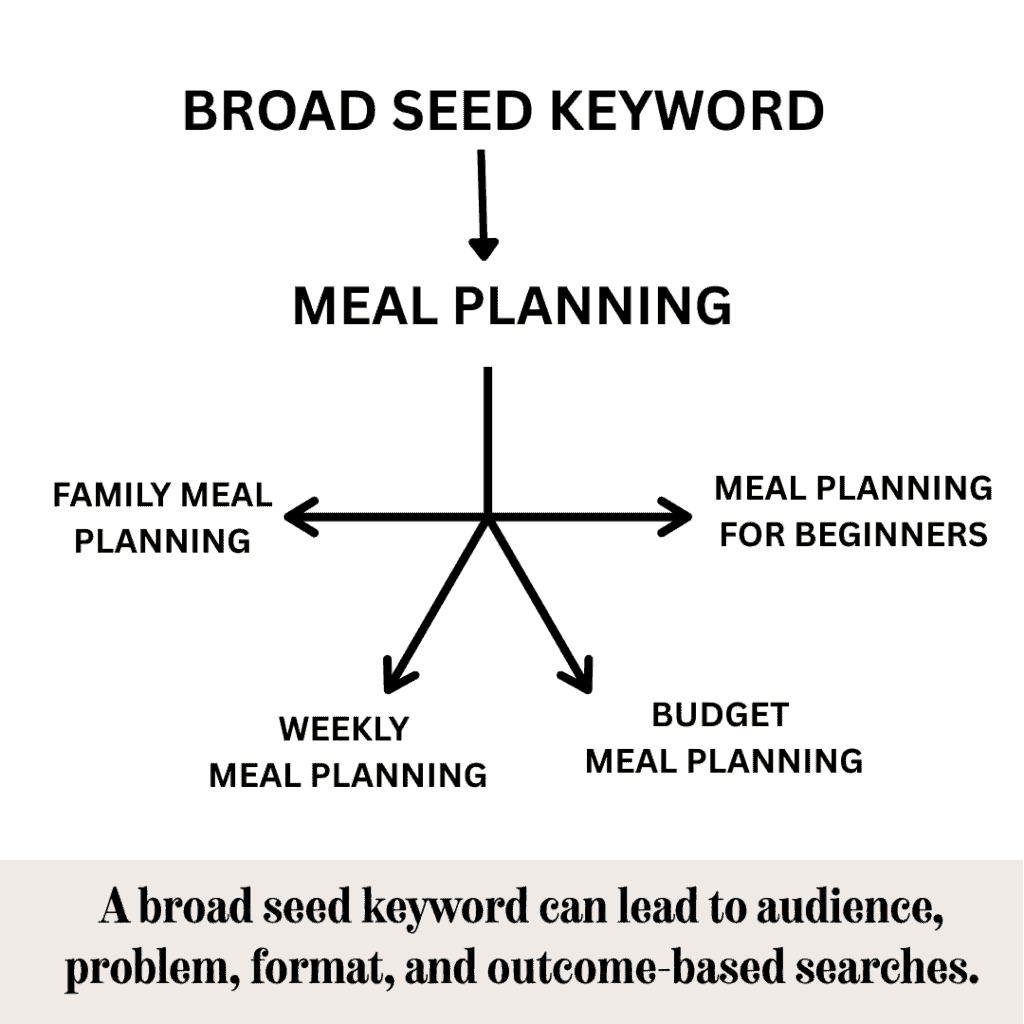
A broad term tells Pinterest the general subject. A more specific keyword phrase reveals what the Pinterest user may actually want within that subject.
The best keywords are not simply the phrases with the highest search volume. They accurately describe the content and lead to search results that match the intended audience, problem, or search need.
A popular keyword that does not match the page, product, recipe, or blog post is not a useful keyword.
Pinterest keywords matter because they help Pinterest’s algorithm connect relevant content with the right people. They are one part of a broader [Pinterest SEO system] that includes visual, topical, and contextual signals. That does not mean every popular keyword is one of the best keywords for your content.
Start With a Seed Keyword
A seed keyword is the simple phrase you use to begin your research.
It should clearly describe the central topic of your content without adding every possible detail.
A seed keyword is usually a broad term rather than the exact keyword you will eventually keep. Its job is to generate more specific searches, keyword ideas, and related terms.
For most blog posts, the seed keyword identifies the general subject while the more specific keyword phrase reveals the actual search need.
For example: Pinterest Marketing
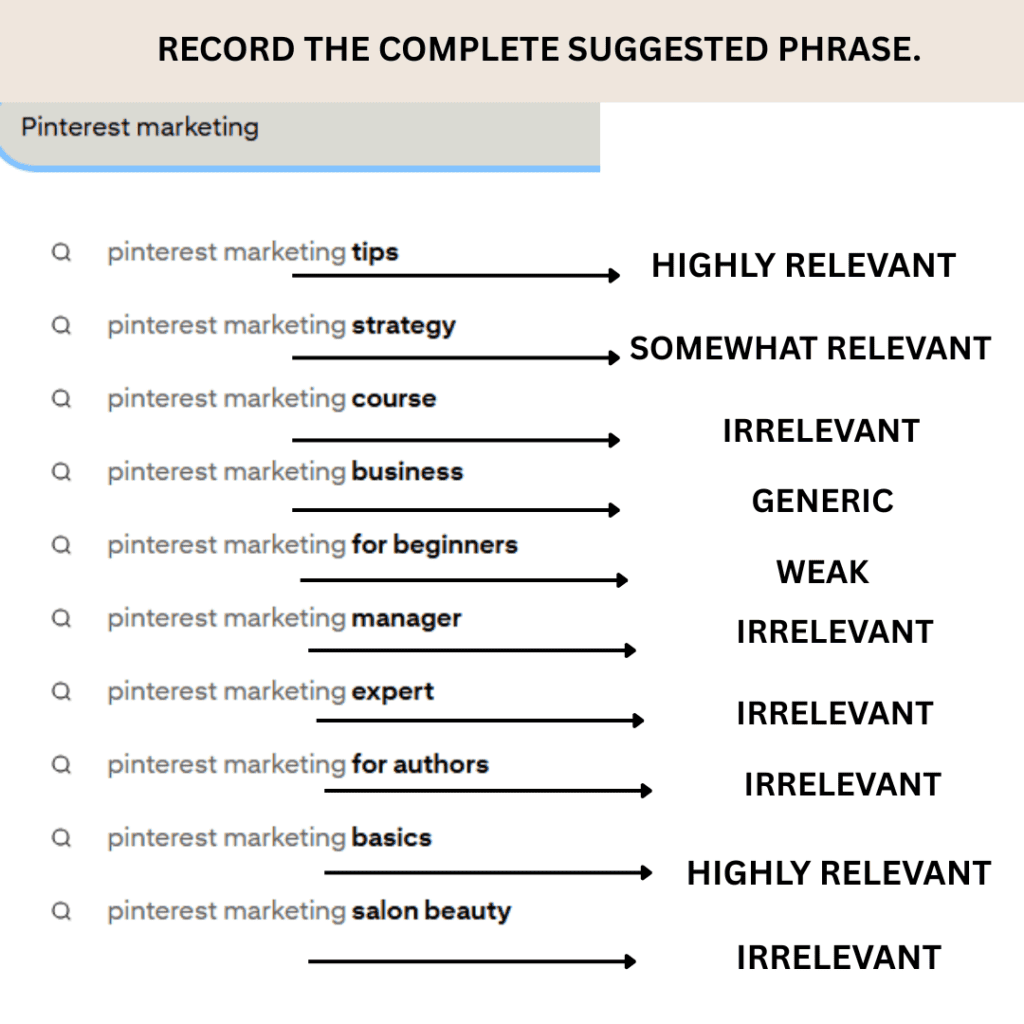
The seed keyword gives Pinterest enough information to begin suggesting related terms.
Do not worry about finding the perfect phrase immediately. Its purpose is to open the first search pathway.
You can then test broader and narrower versions.
For a raspberry crumble cookie recipe, you might begin with:
- raspberry cookies
- crumble cookies
- shortbread cookies
- jam-filled cookies
Each phrase may lead Pinterest into a slightly different group of search results and related keywords.
Use the Pinterest Search Bar
The Pinterest search bar is the easiest free Pinterest keyword tool available because it reflects language Pinterest users are actively entering or exploring on the platform.
Pinterest allows users to enter their own search terms or select suggested terms to explore related ideas. Suggested topics may be influenced by what is trending as well as the individual user’s interests and previous activity.
These suggestions can reveal popular search terms, broad terms, and more specific phrases connected with the original seed keyword.
To begin:
Log in to Pinterest.
Click or tap the search bar.
Enter your seed keyword slowly.
Pause before completing the search.
Record the suggested phrases that appear.
For example, typing meal planning might produce suggestions related to:
- meal planning for beginners
- weekly meal planning
- healthy meal planning
- family meal planning
- budget meal planning
The exact suggestions can vary by user, device, location, language, and current Pinterest activity. For a less personalized comparison, repeat important searches in a logged-out browser or private window, then compare those results with the suggestions shown inside your Pinterest account.
This means autocomplete is useful evidence that Pinterest recognizes or surfaces the wording, but it is not a fixed master list of every keyword on Pinterest or proof of exact monthly search volume.
Record the complete phrase
Do not reduce every suggestion back to the broad keyword.
If Pinterest suggests budget meal planning for families, record the complete phrase rather than saving only meal planning.
The additional words reveal the specific search direction:
- budget identifies a financial concern
- for families identifies the target audience
- meal planning establishes the main topic
Those details help you understand what Pinterest users may be trying to find.
Test Different Versions of the Same Search
Pinterest does not always treat every variation as identical.
Testing natural language can uncover phrases that do not appear when you search only with short, general keywords.
A question-style search may produce different results than an exact keyword or short noun phrase.
Test several versions of your seed keyword, including:
- singular and plural forms
- nouns and action phrases
- broad and specific wording
- common alternate names
- different word order
- questions and natural-language phrases
For example, you could compare:
- Pinterest keyword
- Pinterest keywords
- Pinterest keyword research
- find Pinterest keywords
- how to find Pinterest keywords
- keywords on Pinterest
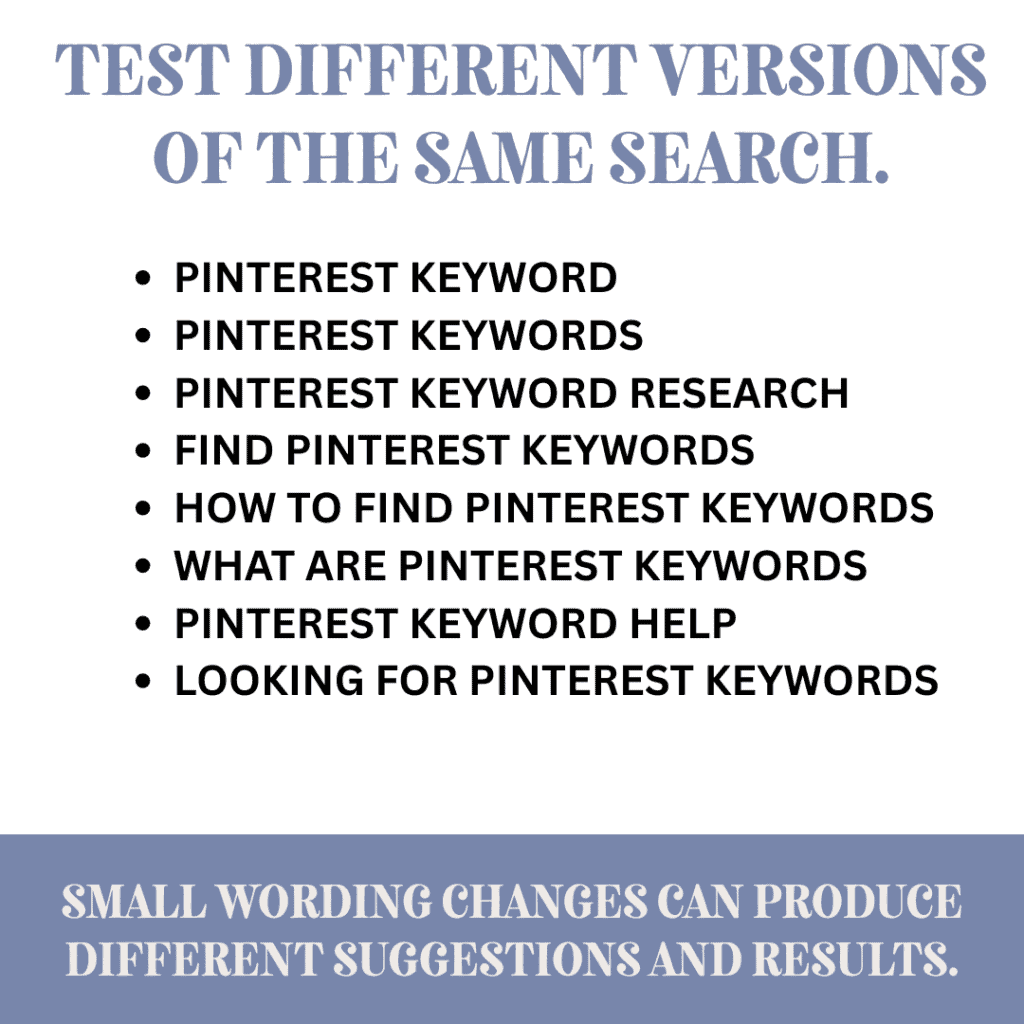
You may see overlapping suggestions, but you may also uncover different keyword ideas.
For a food topic, you could compare:
- chicken dinner
- chicken dinners
- chicken dinner ideas
- easy chicken dinner
- what to make with chicken
- quick chicken dinner for family
Do not assume the phrase you personally use is the phrase Pinterest users are most likely to search.
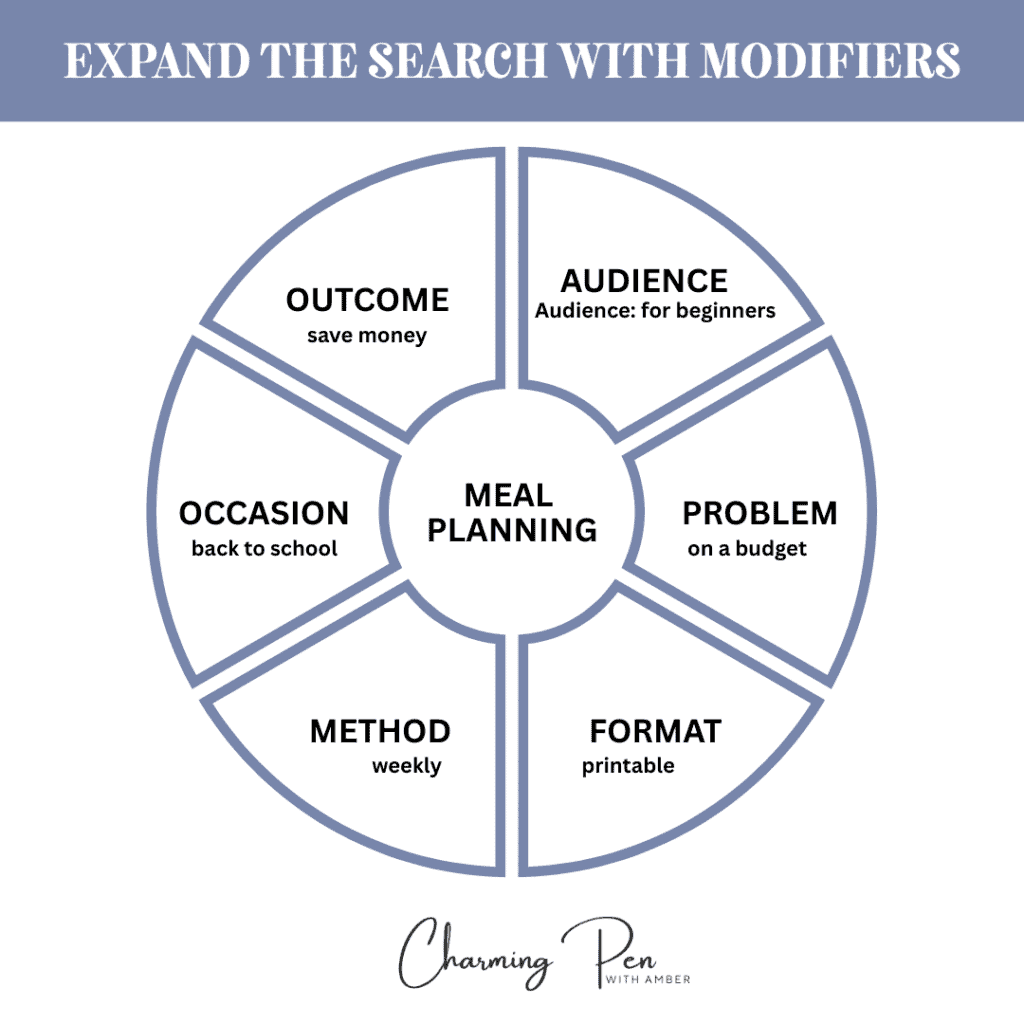
Expand the Search With Modifiers
A modifier is a word or phrase that makes a broad keyword more specific.
Testing modifiers is one of the most effective ways to find long-tail keywords.
Audience modifiers
These identify who the content is for:
- for beginners
- for families
- for kids
- for small businesses
- for content creators
- for busy moms
- for bloggers
Problem modifiers
These identify the difficulty or question being addressed:
- not getting views
- low traffic
- on a budget
- without experience
- for small spaces
- without an oven
- when short on time
Format modifiers
These identify what kind of result someone wants:
- checklist
- tutorial
- guide
- ideas
- examples
- template
- printable
- step-by-step
Method or feature modifiers
These describe how something is made or completed:
- air fryer
- slow cooker
- no bake
- DIY
- organic
- beginner-friendly
- one pot
- free
Occasion and timing modifiers
These describe when the idea is useful:
- for Christmas
- for summer
- for a birthday
- for weeknights
- last minute
- in 30 minutes
- for back to school
Outcome modifiers
These describe the desired result:
- to save money
- to increase traffic
- to stay organized
- to get more clients
- to improve storage
- to simplify dinner
Add these modifiers to the seed keyword and enter the new phrase into Pinterest search.
The goal is not to invent a long list and automatically treat every phrase as a verified Pinterest keyword. The goal is to generate specific phrases that you can test on the platform.
This is one of the most effective ways to move from a broad keyword to specific keywords that better describe the ideal audience and the problem the content solves.
Use Pinterest’s Suggested Search Guides
After you run a search, Pinterest may display suggested words or phrases near the search bar.
Pinterest may display additional guide terms or suggested refinements around a search. Selecting one narrows the original search and can reveal how Pinterest subdivides a broad topic. Pinterest may also group more specific terms inside a drop-down menu.
Search guides can help reveal related keywords and narrower keyword phrases that may be difficult to find through autocomplete alone.
For example, someone searching for pie recipes might be shown a guide related to fruit. Selecting a more specific fruit term would create a narrower search.
These guides are particularly useful because they show how Pinterest subdivides a broad topic.
They are especially useful when a broad term has several possible meanings or audiences.
A search for home office ideas might be refined by concepts such as:
- small spaces
- modern
- storage
- desk
- apartment
- cozy
- on a budget
A search for birthday cakes might lead toward:
- chocolate
- easy
- for kids
- floral
- vintage
- number cakes
- sheet cakes
Record the guide terms that genuinely relate to your content.
You do not need to collect every term Pinterest displays. A relevant keyword list is more useful than a large list filled with phrases that do not describe the content.
Study the Pinterest Search Results
Pinterest search results act as a visible layer between the keyword someone enters and the content Pinterest chooses to distribute.
Finding Pinterest keywords is not only about copying words from the search bar.
You also need to examine what Pinterest returns for the search.
The search results are one of the most important places to evaluate whether a keyword matches the relevant content you plan to publish.
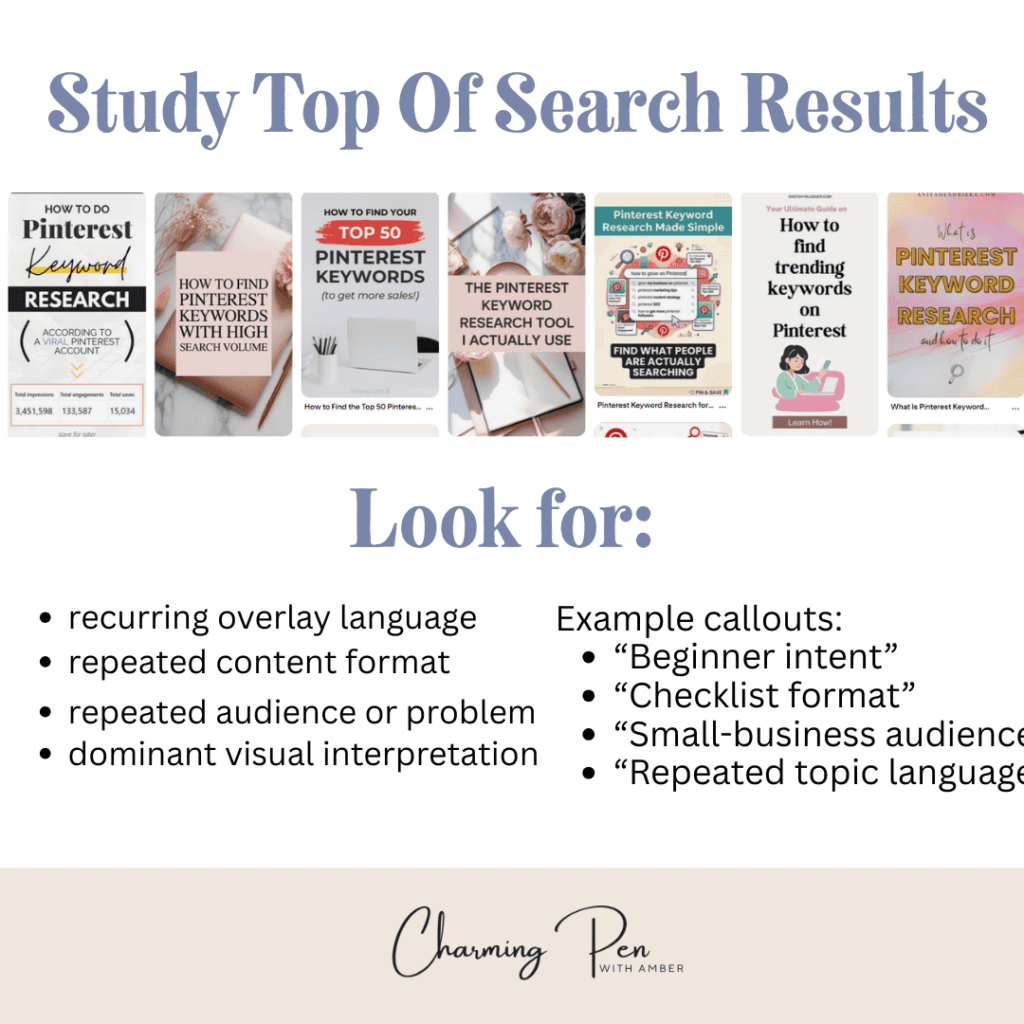
Enter the keyword phrase and review the first group of results. Ask:
- Does the search produce the type of content I expected?
- What subject appears most often?
- Are the results informational, inspirational, commercial, or instructional?
- What words repeatedly appear in Pin titles and text overlays?
- What content formats dominate the results?
- Is Pinterest interpreting the phrase differently than I intended?
Search relevance is only part of the equation. The Pin still needs a design that makes the searcher want to stop and click.
This step helps identify search intent.
The best results are not necessarily the Pins with the most polished pin designs. They are the results that reveal how Pinterest interprets the phrase and which Pinterest content it considers relevant.
A phrase can sound relevant while producing results for a different audience or purpose.
For example, someone researching Pinterest keywords may expect business and marketing content. However, the results could also include people looking for aesthetic words, profile-picture ideas, wallpapers, design elements, or terms to type into Pinterest for visual inspiration.
The keyword exists, but its meaning is broad.
This is why a keyword strategy cannot be based on high search volume alone. The main keyword still needs to attract the right people for the specific content.
A more specific phrase such as how to find Pinterest keywords for business may produce a more focused set of search results.
Look beyond the first Pin
Do not choose a keyword based on a single result.
Look for repeated patterns across multiple Pinterest Pins:
- recurring terms
- similar visual subjects
- repeated problems
- common audiences
- frequent content formats
Repeated patterns provide stronger evidence of how Pinterest understands the search. Those topic and relevance signals also influence how Pinterest decides where and when to distribute a Pin.
Filter the Search Results
Pinterest may allow you to filter results by content type, including Pins, Boards, Profiles, Videos, or Products. The options shown can vary by device and search.
These filters can reveal additional keyword language.
Search Pins
Use Pins to examine:
- Pin titles
- text overlays
- content formats
- recurring descriptive language
- Search Boards
Use the Boards filter to study:
- board titles
- board names
- how broad or narrow the boards are
- related phrases used to organize the topic
Board results can be especially useful because they show how Pinterest groups a topic. That grouping becomes especially important when you are deciding how boards should support the wider subject structure of an account. A broad keyword may lead to boards organized by audience, method, season, format, or problem. Check the board itself to confirm that its Pins genuinely match the phrase before adding it to your keyword list.
Search Profiles
Use profile results to see:
- how businesses and content creators describe their niche
- recurring industry terminology
- broad topic categories connected with the search
This is research, not an invitation to copy another creator’s wording. Repeated language across many results is more useful than wording found on a single Pin. You are identifying patterns in Pinterest’s search environment, not borrowing another creator’s title or description.
Explore Related Pins and Boards
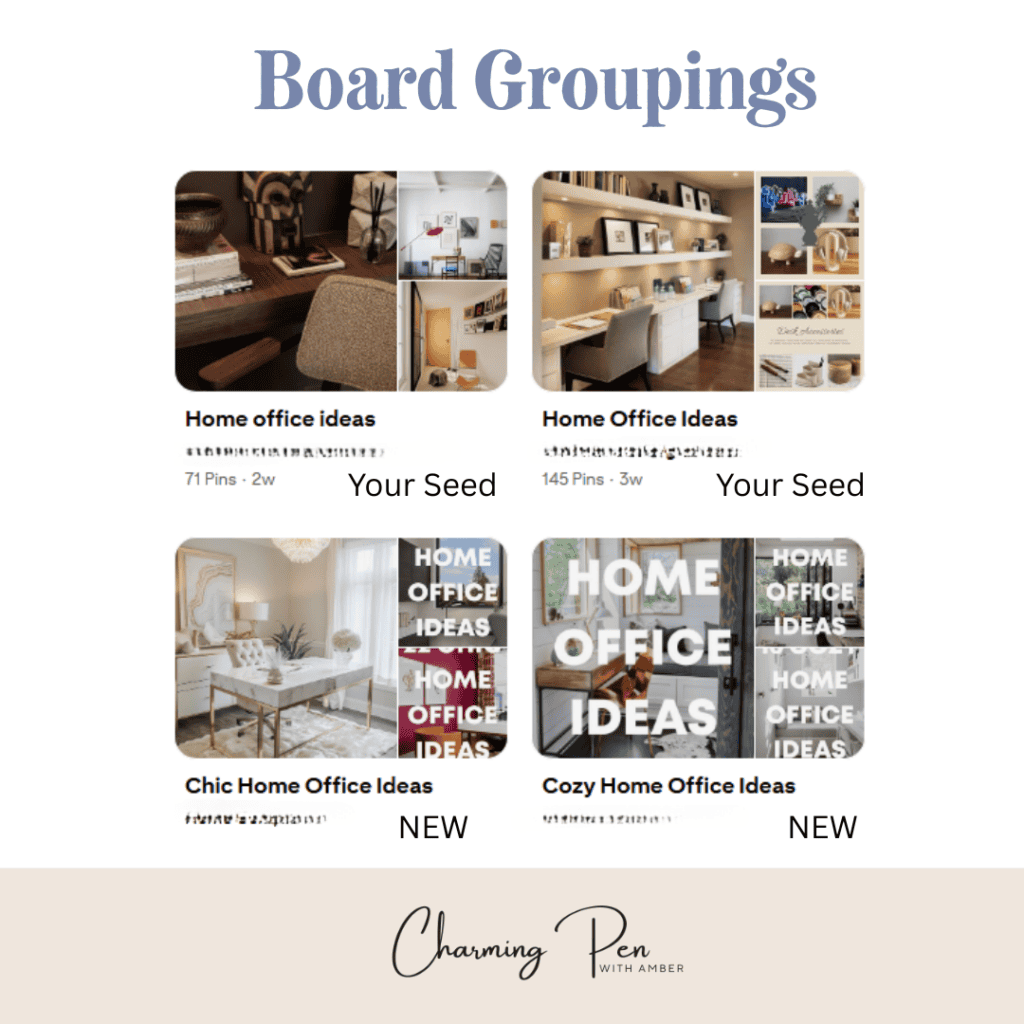
Pinterest recommends additional ideas based on the Pins, boards, searches, and other activity connected with an account. Users can also open a Pin or board and scroll to find related ideas.
This can help you discover adjacent terms that did not appear during your original search.
For example, a search beginning with easy lunch ideas might lead to related content involving:
- meal prep lunches
- cold lunch ideas
- work lunches
- high-protein lunches
- school lunch ideas
- no-reheat lunches
These related terms may reveal additional seed keywords worth testing.
Be careful, though: recommendations are personalized. A related Pin appearing in your feed does not automatically mean its title is a popular keyword.
Take the phrase back to the Pinterest search bar and examine the search suggestions and results before adding it to your working list.
Use Visual Search to Find Related Concepts
Pinterest search is not limited to typed keywords.
Because Pinterest is a visual search engine, keywords are only one source of meaning. Pinterest can also interpret objects, colors, composition, and visual relationships within Pinterest Pins.
Pinterest’s visual search features allow users to search with an image or select an individual object within a Pin to find visually similar ideas. Pinterest may also provide suggested keywords or refinements connected with the selected object.

This is useful when an image contains several possible subjects.
For example, a photograph of a dining table might contain:
- a floral centrepiece
- linen napkins
- ceramic dinnerware
- taper candles
- a holiday table setting
Visual search can help reveal which objects and concepts Pinterest connects with the image.
This does not replace text-based keyword research. It adds another layer by showing how Pinterest may interpret the visual subject. Visual search can reveal related objects and concepts, but it does not automatically tell you which keyword has the strongest search demand.
Use Pinterest Trends
Pinterest Trends can help you compare broad search terms, observe seasonal interest, and investigate related ideas when data is available.
Use it to compare broad search terms, observe seasonal interest, and investigate related ideas when data is available.
Pinterest Trends can help answer questions such as:
- Does interest rise during a particular season?
- Is one phrase more established than another?
- When does interest normally begin increasing?
- Are there related topics worth researching?
- Does the keyword fit the country or audience being targeted?
Do not expect every useful long-tail keyword to have visible trend data.
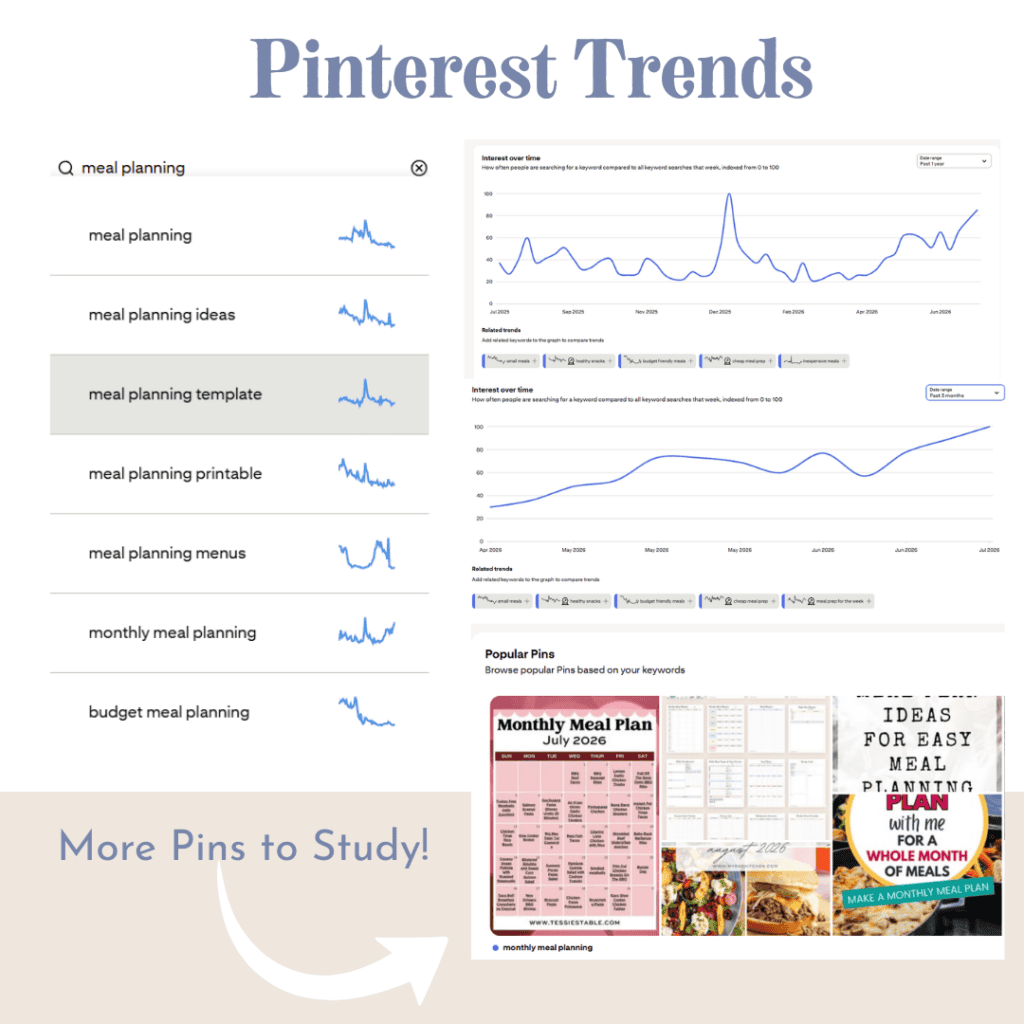
A specific phrase may be highly relevant even when it does not have enough volume to appear in a broad trend database. Pinterest Trends is one research signal, not the final judge of whether a keyword is useful.
Can You Find Pinterest Search Volume for Free?
Pinterest’s native search suggestions can show you related language, but they do not necessarily provide a precise monthly search-volume number for every phrase.
The order of autocomplete suggestions should not be treated as a guaranteed ranking from highest to lowest search volume.
Pinterest Trends may provide comparative interest data for some searches, but it will not include every specific phrase.
This is where third-party tools can add another layer. Pinterest keyword research tools may offer estimated volume, bulk suggestion collection, trend comparisons, or access to Pinterest interest data.
However, estimated search volume should never replace relevance. Broad claims about what always works on Pinterest should be tested against the actual topic and search environment.
A specific keyword with modest demand can be more useful than a broad, high-volume phrase that attracts the wrong people.
Build a Simple Pinterest Keyword List
You do not need complicated software to organize the phrases you find.
A spreadsheet can include:
| Seed keyword | Suggested phrase | Source | Search intent | Relevant |
| meal planning | meal planning for beginners | Search bar | Learning | Yes |
| meal planning | budget family meal planning | Search guide | Saving | Yes |
| meal planning | weekly meal planning printable | Related search | Planning tool | Maybe |
| meal planning | vegan meal planning | Search result | Dietary | No |
The relevance column is important.
A phrase should not remain on the keyword list merely because Pinterest suggested it. Keep a phrase only when three things are true:
- Pinterest surfaces or recognizes the wording.
- The search results match the intended meaning.
- The phrase accurately describes the specific content.
You can also group phrases by:
- main topic
- audience
- problem
- format
- occasion
- method
- outcome
That will make the list easier to review later.
Do You Need a Paid Pinterest Keyword Tool?
No. You can build a useful Pinterest keyword list with:
- the Pinterest search bar
- autocomplete suggestions
- search guides
- related search results
- Pin, board, and profile filters
- visual search
- Pinterest Trends
- a spreadsheet
You can still build a functional Pinterest process without relying on a scheduling or research platform.
Paid tools can make the process faster by collecting more terms, organizing related keywords, or attaching estimated search-volume data. Tools such as Pin Inspector, PinClicks, and Tailwind can be useful when you need to expand beyond manual research, but they are not required to begin.
A tool can help you collect and compare keyword data. It cannot decide whether a phrase accurately represents your specific content. That decision still requires human review.
Can ChatGPT Find Pinterest Keywords?
ChatGPT can help generate keyword ideas, but it should not be treated as direct proof of Pinterest search activity. It is best used before or after Pinterest research—not instead of it.
It can also help organize or draft Pinterest copy once the research has been verified.
It can help you:
- generate seed keyword variations
- identify possible audience modifiers
- suggest problem-based searches
- organize an existing keyword list
- group phrases by topic
- find alternate wording to test
- turn exported data into a cleaner worksheet
For example, you could use this prompt:
Clear instructions, relevant context and a defined output format generally produce more useful results from ChatGPT.
I am researching Pinterest keywords for [topic]. Generate seed phrases to test inside Pinterest. Organize them by audience, problem, format, method, occasion, and desired outcome. Do not claim that the phrases have Pinterest search volume.
Take the resulting ideas back to Pinterest.
Check whether:
- Pinterest suggests the phrase
- the search results match the intended topic
- related guides appear
- the phrase is relevant to the actual content
- Pinterest Trends contains supporting information
ChatGPT can accelerate brainstorming. Pinterest is still the place where those ideas need to be tested.
Where Are Pinterest Keywords Used?
Pinterest keywords can be connected with several parts of an account and its content, including:
- Pin titles
- Pin descriptions
- board titles
- board descriptions
- profile language
- website content associated with a Pin
Finding the keywords is only the first part of the work.
Choosing the right phrases, deciding which terms belong together, and determining how they should support a Pinterest account require a broader keyword strategy.
This guide is intentionally focused on discovery: finding the language Pinterest displays around a topic before deciding what to do with it.
Final Thoughts on Finding Pinterest Keywords for Free
The best place to begin Pinterest keyword research is Pinterest.
Start with a clear seed keyword. Watch the suggestions that appear in the Pinterest search bar. Open the search and examine Pinterest’s guides, filters, Pins, boards, profiles, and related ideas. Test long-tail keywords and verify that the results match the content you intend to create.
You do not need to pay for a Pinterest SEO tool to begin.
Pinterest also classifies content into entities and related topic groups, which affects where a Pin may be surfaced.
The free process takes longer, but it teaches you something a keyword list alone cannot show: how Pinterest interprets a search, what kind of content it places in that result set, and whether your idea truly belongs there.
Prefer to Have the Research Done for You?
Finding Pinterest keywords manually is free, but researching multiple pathways, removing irrelevant results, and organizing the useful data takes time.
I offer Pinterest keyword research for businesses and content creators managing their own accounts. Choose a focused report for one article or a batch of upcoming topics and receive cleaned Pinterest-native keyword data, relevant long-tail searches, available search-volume information, and expanded topic insights based on the package selected.